
Employees who use the CVS Health employee portal may occasionally need to reset their login credentials to regain access to internal systems. The CVS Colleague Zone is the main employee hub used to access HR tools, workforce services, schedules, payroll resources, and company applications.
Because different employee groups use different identity systems, CVS provides several password reset options depending on your role within the company.
This guide explains who uses each reset system and how employees can reset their CVS Colleague Zone password safely.
CVS Colleague Zone Password Reset Options
Employees using the CVS Colleague Zone or other CVS employee portal systems may need to reset their password depending on their role within CVS Health.
Different employee groups have separate password reset systems designed for their internal applications and identity management tools.
Employees should select the correct category based on their job role.
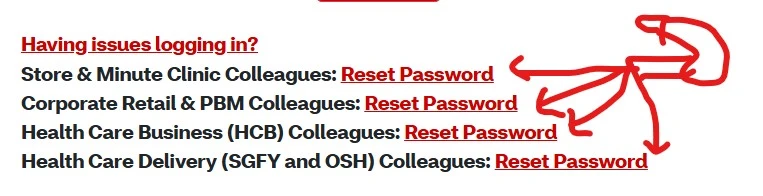
Store & MinuteClinic Colleagues – Reset Password
Employees working in retail stores or MinuteClinic locations can reset their login credentials through the Store & MinuteClinic password reset portal.
These employees typically include:
- Store associates
- Pharmacists
- Pharmacy technicians
- MinuteClinic staff
These workers use the reset system to recover access to:
- CVS Colleague Zone login
- Scheduling systems
- Workforce tools
- Other employee portal services
Most employees in this category sign in using their 7-digit Employee ID or Contractor ID.
Corporate, Retail & PBM Colleagues – Reset Password
Corporate employees and colleagues working in CVS Caremark operations can reset their credentials through the corporate password recovery system.
This group may include:
- Corporate office staff
- Retail operations teams
- Pharmacy Benefit Management (PBM) employees
Resetting credentials restores access to systems connected to the CVS employee portal, including:
- HR tools
- payroll systems
- internal company applications
- workforce services
Many corporate employees authenticate using C-ID or NT-ID credentials.
Health Care Business (HCB) Colleagues – Reset Password
Employees working in the Health Care Business (HCB) division can reset their passwords through the HCB identity management system.
These systems support access to:
- Internal healthcare applications
- Workforce management tools
- Employee service portals
- Operational systems used within healthcare divisions
The reset process restores secure access to systems used by healthcare business teams within CVS Health.
Health Care Delivery Colleagues (SGFY and OSH) – Reset Password
Employees working in Health Care Delivery divisions can reset their credentials through dedicated healthcare identity systems.
This includes teams associated with:
- Signify Health
- Oak Street Health
These systems help employees regain access to:
- Healthcare operational tools
- internal employee resources
- workforce platforms used in care delivery
What Information Is Required to Change a CVS Colleague Zone Password?
To sign in to the My Password system, employees must enter one of several identification credentials depending on their role.
1. 7-Digit Employee ID or Contractor ID
Most CVS employees and contractors access systems using their assigned:
- 7-digit Employee ID
- Contractor ID
This ID is commonly used for authentication in retail and store-based systems.
2. newCVS C-ID / NT-ID
Employees working within internal corporate networks may log in using:
- newCVS C-ID
- NT-ID
These identifiers are used across company networks for authentication and secure access to enterprise systems.
3. Aetna A/N ID
Employees associated with Aetna may use an A/N ID to log into shared applications and services within the CVS ecosystem.
4. Vendor ID
External partners working with CVS Health may receive a Vendor ID to access specific internal systems.
This ensures secure access while maintaining role-based permissions for external collaborators.
How to Reset CVS Colleague Zone Password?
If employees forget their password, they can reset it through the password recovery system.
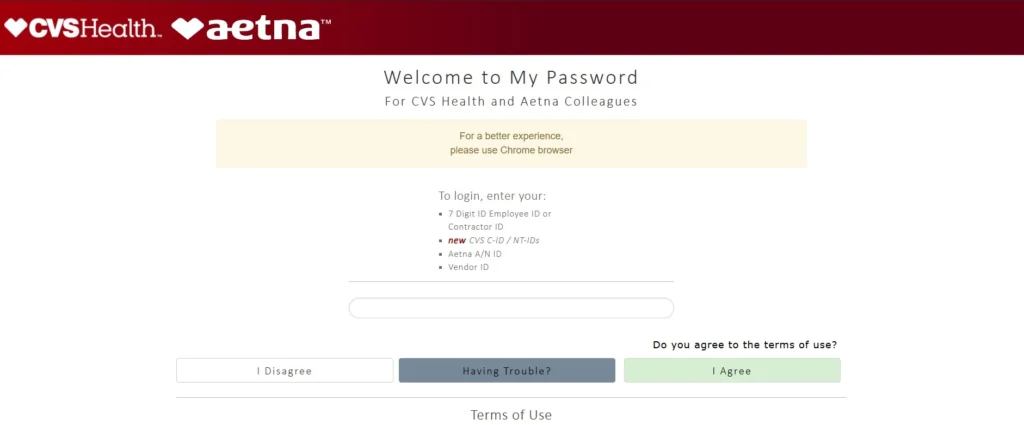
1. Go to the Password Reset Page
Visit the CVS employee portal login page and navigate to the password recovery section.
2. Select Your Employee Category
Choose the correct reset category based on your role:
- Store & MinuteClinic
- Corporate Retail & PBM
- Health Care Business
- Health Care Delivery
3. Enter Your Identification Credential
Enter the required credential such as:
- 7-digit Employee ID
- Employee ID or Contractor ID
- newCVS C-ID / NT-ID
- Aetna A/N ID
- Vendor ID
4. Accept the Security Terms
Select “I Agree” or continue through the authentication prompt.
5. Click “Forgot Password”
Choose the Forgot Password option to begin recovery.
6. Verify Your Identity
Enter the requested information such as your employee ID or login credential.
7. Follow the Reset Instructions
The system will guide you through the remaining steps.
8. Create a New Password
Set a new secure password that meets CVS security requirements.
After completing these steps, employees can return to the login page and sign in with their new password.
Fix CVS Employee Portal Login Errors
If employees still cannot log in after resetting their password, try these troubleshooting steps:
- Verify the correct employee ID or login credential
- Re-enter login details carefully
- Clear browser cookies and cache
- Try another web browser
- Check the internet connection
If problems continue, employees should contact CVS IT support or their manager for further assistance.
Referances
CVS official links for Colleague Zone password help
| Purpose | Official link | |
|---|---|---|
| MyHR / Colleague Zone login (CVS employee portal) | Primary Colleague Zone / MyHR sign‑in for current and former colleagues; start here for password reset and account recovery. | https://myhr.cvs.com youtube |
| CVS password reset (CVS assets reset page) | Direct password reset form / “Forgot Password” landing used by CVS account systems. | https://cvsassets.cvshealth.com/us/en/login/reset-password.html cvsassets.cvshealth |
| CVS Account Management — Help | General account management, password rules, and official contact/help resources for CVS accounts. | https://www.cvs.com/retail/help/help-subtopic-account-management cvs |
| CVS Caremark RxServices — Password Recover | Pharmacy/benefits portal password recovery (Caremark/RxServices). | https://rxservices.cvscaremark.com/Login/PasswordRecover rxservices.cvscaremark |